

Retail Scheduling: Modern Tips Beyond Boring Spreadsheets and Snapchat

Retail scheduling is increasingly more challenging for managers and staff as labor shortages persist and more current employees turnover for other opportunities.
These challenges also present an opportunity to do better. To schedule employees in a way that’s collaborative, doesn’t stress you or your managers out, and helps the business run more efficiently. We’ll explore several options including using common methods like spreadsheets, as well as other staff scheduling software options.
By the end of this guide, you’ll be equipped with a step by step process that includes retail-specific best practices to begin scheduling your staff. While avoiding scheduling pitfalls, headaches, and leaving behind out-dated practices for 2024.
Table of Contents
- The Changing Landscape of Retail Scheduling
- Important Industry Best Practices
- How to Schedule Employees in Retail
- The Easier Way for Retail Scheduling
The Changing Landscape of Retail Scheduling
Retail scheduling is changing to attract and retain Gen Z workers by integrating technology and social media into recruitment and scheduling processes.
Flexibility is a must
There’s an increasing emphasis on flexibility, with schedules becoming more employee-centric, accommodating each individual’s preferences and availability.
A large majority of new retail workers are Generation Z, and their preferences lean towards open, honest and transparent communication.
They expect to have a flexible work schedule and environment. These changes reflect a shift towards a more modern, adaptive approach in retail workforce management, catering to the unique preferences of the younger generation.
Paper schedules need to go!
Scheduling practices in many workplaces, especially in retail, often involve manual methods. This could include manually creating the spreadsheet and printing out the schedule. Having a manual process of posting it on an intranet, or other manual processes like texting employee’s pictures of the schedule.
For instance, nearly 68% of employee work schedules are handwritten, and almost half of shift workers in the U.S. receive their weekly work schedule on a piece of paper.
However, the major trend shift for this area is underway as employees constantly run into annoyances with paper schedules. Our shift scheduling software is here to help.
Apps that shouldn’t be used for scheduling are being used
As the landscape of technology changes, so do retail scheduling practices. Social media platforms like Snapchat, popular among Gen Z, are gaining traction with use for retail schedules. If scheduling is done on paper, It’s now quite common for staff to take pictures of the schedule and send it to other employees via Snapchat or other social apps.
Another example, McDonald’s used Snapchat to create a “Snaplications” campaign, allowing users to apply for jobs in a more engaging and informal way. They know their demographic prefers to use these tools because the alternative is pen and paper. This approach aligns with the preferences of Gen Z, who often spend a lot of time on social media.
Recommended Reading:How to Create 24/7 Staff Schedules + Tips and Industry Specific Insights

Important Industry Best Practices
When it comes to retail, there are specific best practices to follow for the industry. Improving on any area from these best practices will help set you up for success when it comes to successfully scheduling your employees.
Understanding Business Needs
It’s important to take a step back and analyze your business. Look into customer traffic patterns, peak hours, and sales trends. This will help you understand when you can schedule more or less staff to handle the changes in demand and avoid overstaffing to save on labor costs.
Tactics to Apply
- Review monthly and weekly sales data to see patterns;
- Conduct regular team meetings to discuss upcoming events or promotions that might affect staffing needs;
- Review Google Business customer traffic peaks;
- Determine yearly seasonal patterns of the business.
Employee Availability and Preferences
Your employees availability and preferences should take a high priority when considering who to assign to each shift. A balance should be struck between business needs and employee work-life balance. Managers can improve staff morale and reduce turnover by accommodating employee preference, and putting them first.
Tactics to Apply
- Create a system for employees to submit their available times and preferences;
- Allow employees to adjust their available times based on a flexible rule. Example, submit availability changes 2 weeks in advance.
- Implement a rotating shift schedule to ensure fairness in allocating the best shifts.
Adhere to Local Laws and Regulations
While it may sound obvious, it can be easy to make mistakes with scheduling regulations if you’re using manual scheduling processes. Comply with local and state laws regarding advance notice of schedules, shift changes, number of hours worked, etc. Non-compliance can result in serious penalties, so you and your managers need to be aware of and adhere to these regulations.
Tactics to Apply
- Provide regular training sessions for managers on the latest scheduling laws and best practices.
- Put systems in place that prevent staff from being scheduled or working if there is a potential labor violation.
Automated Scheduling
Wouldn’t it be nice if you could simply automate your staff scheduling, without errors? That’s where automatic employee scheduling software, like Evolia, come in. This reduces the time spent on manually plotting each employee’s schedule, decreases the likelihood of errors, and ensures a fair distribution of shifts.
Tactics to Apply
- Implement scheduling software that can automate shift assignments based on set parameters;
- Get employees in on the fun and allow them to swap shifts and update their own availability for easier automation;
- Use Evolia for Free, to save countless hours and automate your schedules.
Postings the Schedule Well in Advance
No one likes to get their schedule the day before a shift. Post schedules in advance and on a consistent basis in terms of time and format. It will allow employees to plan and have a more stable lifestyle, which is proven to increase sales!
And you can avoid having complications like this…
Manager Doesn’t Post Hours Soon Enough
byu/bookwormagain inMichaelsEmployees
Tactics to Apply
- Use digital tools, like Evolia, to share schedules that automatically notify other staff of scheduling changes;
- Announce the time when schedules will be published, and never deviate from that time, unless staff request otherwise.
Communication and Transparency
Maintain open lines of communication regarding scheduling, allowing employees to express their preferences and concerns.
If large scheduling practices or changes are going to be made, for example, by adding another shift or changing schedules for mixing in night shifts, these need to be communicated and discussed with your workforce.
Without this collaboration and transparency, you’ll see turnover increase as staff move to find more accommodating employers.
Tactics to Apply
- Implement an open-door policy for employees to discuss scheduling issues or concerns;
- Allow employees to share feedback via anonymous forms.
Recommended Reading: The Modern Way to Recruit Employees in Retail
How to Schedule Employees in Retail
Now, let’s dive in for how you can actually create your retail schedule for your staff, using Excel or Google Sheets. This is a long and manual process, so we’ve also included an easier option if you want to check that out, too.
Skip to the EASY way of Retail Scheduling
Step 1: Create a new Spreadsheet
First, create a new spreadsheet in Excel or Google Sheets and name your spreadsheet with some convention like “Retail Schedule for [Business Name] – Week of [Date]”.
Step 2: Define Your Timeframe
At the top of the spreadsheet and for the tab name, specify the scheduling period. The most common periods include:
- Weekly schedules;
- Bi-weekly (aligns with pay periods);
- Monthly schedules;
You’ll also want to define the opening and closing hours so staff assignments fit accordingly.
Step 3: List Employee Names
In the first column, list the names of all your employees. You may want to include their roles if they have specific positions that influence their scheduling (e.g., cashier, floor manager).
Advanced Tip
If you want to get more advanced, create a separate sheet with their First name, Last Name, and position, in a new tab. Then you can use a Vlookup function to reference a name or position to fill in certain cells in your main sheet. This is useful if you have lots of different departments with high turnover and want one master employee tab.
Step 4: Create Date and Time Columns for Operating Hours
Across the top row, enter the dates for the scheduling period. Under each date, add columns for shift start time, end time, and any breaks. Ensure there is enough space to write in shift details for each employee.
Before assigning shifts, input the operating hours of your store on each day. This gives you a framework for shift scheduling.
Step 5: Consider Employee Availability and Preferences
Now, gather information about each employee’s availability and any time-off requests. So you can verify and check that you’re not scheduling employees that cannot work or have important personal commitments.
Advanced Tip
If you’ve set up the advanced route of having a separate sheet for your employee list mentioned above, this is an additional option. Input 7 columns (if using weekly timeframes) beside their name to specify if they are available for shifts Sunday to Saturday. Formulas can then be used to verify and pull this into the main scheduling sheet.
Step 6: Assign Shifts
Now, the decision making. It’s time to assign shifts. Go through each day and period and assign workers based on your business demands and their positions.
Be mindful of labor regulations and laws in your local state or province.
It’s also very important to consider each member’s position and skillset to make sure each department or area of the store has enough staff.
Advanced Tip
One very important aspect is to make . To do this, use conditional formatting to create a red cell for when certain hours or number of shifts hits a certain threshold.
Other Resources
Step 7: Balance Shifts Fairly
One of the hardest things about scheduling a diverse set of employees is the different requirements and needs that certain staff have. And as we reviewed, it’s a best practice to manage their preferences with business needs as best as you can.
It’s not only important for the week ahead, to have a well-staffed business, but also for the long term. When shifts are balanced, assigned unfairly, or assigned against employee availability, it harms the relationship with said employee. Ultimately increasing turnover.
Go through each day of the week to ensure fairness and refer to your other tabs in the spreadsheet for notes.
Step 8: Share the Schedule
Once finalized, share the schedule with your team. Ideally, when this is done with a real-time portal or link that can be easily updated if there are scheduling changes.
Step 9: Make updates & reshare
Be prepared to make adjustments to the schedule as needed.
This part is where more scheduling errors usually occur without proper scheduling software. Once the schedule is out, people commit to those shifts. And there are almost always changes that have to be made, so re-sending can become a nightmare for employees who reference older schedules.
Advanced Tip
Have a tab that lists all the employee names and email addresses. When there is a schedule update, create an Excel Macro to mail merge and email these employees about the upcoming changes.
Step 10: Gather feedback manually
After using the schedule for a period, gather feedback from employees about the process and any suggestions they might have. If you don’t have team communication software in place, you’ll have to do this manually.
This common method of scheduling can cause major headaches over time…
This is the old and long way for scheduling employees in retail. As it often leads to disasters like this…
Help! Did manager do this on purpose? I want to quit already.
byu/bongalarium inretailhell
It also creates significant inefficiencies in the business when other staff are required to help other employees know their shifts. Instead of helping the valued customers.
A retail worker has accounted for this themselves on Breakroom.org, by detailing the annoyance of paper schedules while their trying to help people…
“The past few weeks at my store have been bad for this. It never fails that every single time I work guest services, I get at least one TM who calls the store and expects me to drop everything (including the huge line of guests at guest services) to go look at the schedule to see when they work next. Apparently keeping track of one’s own schedule is no longer the “in” thing to do.” – Retail Girl, The Break Room.
Recruit, Schedule & Manage your Workforce FREE
Evolia’s HR and Workforce Management Platform allows you to recruit, schedule, and manage your employees, saving you countless hours in admin work.
The Easier Way for Retail Scheduling
Now for the easy way, with Evolia. Our retail workforce software can help you automate and streamline several of those steps we detailed above, while still having complete control over the schedule.
Step 1: Gather employee information
Once you’ve created your account, head over to the Employee tab and click the + icon to find the options for gathering employee data.
There are two easy ways to do this:
- Add them manually or,
- Import a list of employees with their info.

Add or import details like first name, last name, email, phone, positions, locations, employment status, employee ID, Hourly Wage, Max hours, Hire Date and more. Employees can also receive an invite via email or SMS when you’re setting up their profile.
Step 2: Set the Shifts and Publish
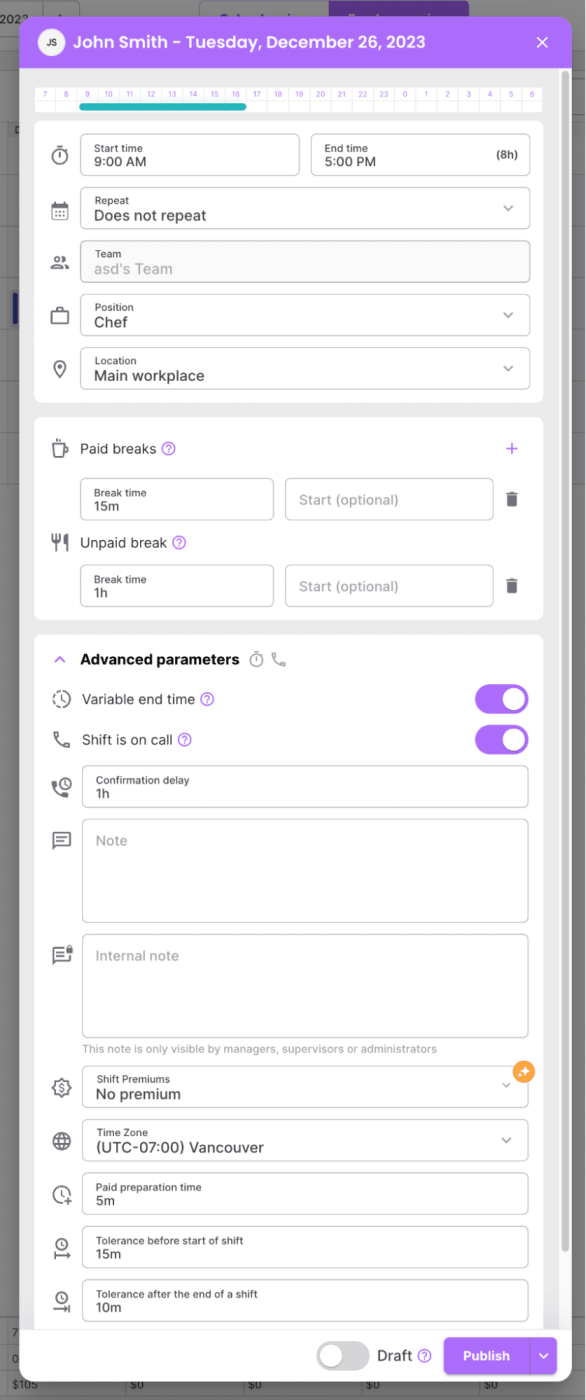
Click on the day column for the employee and row that you want to schedule. This will bring up many different options that allow for future automation with scheduling. Fill in information like position, location, break, shift premiums, on call shifts, variable endings and more.
Once the shifts are set, the schedule is published and shared with the staff, typically via the platform’s communication tools, ensuring that all team members have immediate and easy access to their updated work schedules.
Step 3: Automate the Rest
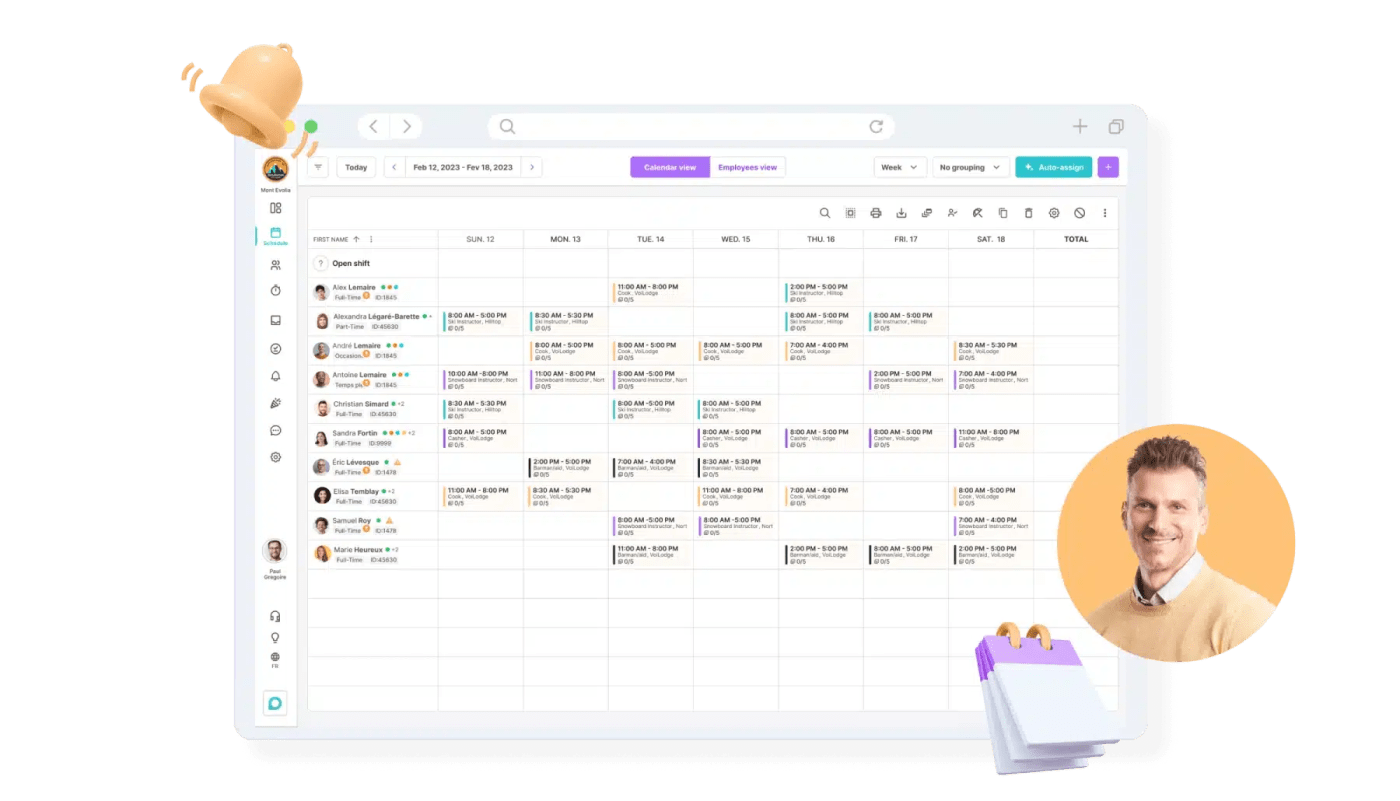
Automate shift swaps, availability, schedule updates and more. Evolia takes over to handle ongoing scheduling tasks. This includes updating schedules based on real-time changes, such as shift swaps or leave requests. Automation ensures that schedules remain optimized to your business without constant manual intervention, saving significant managerial time and effort.
Save even more time so you can focus on more important parts of your business.
Integrate Scheduling with Timekeeping and Payroll
Evolia can integrate with other systems such as payroll and timekeeping, streamlining multiple aspects of workforce management. This integration reduces the administrative load and can lead to more accurate payroll processing, as well as compliance with labor laws. Check out our listing on ADP Workforce Now.
Automated Scheduling
Evolia can automate the scheduling process, allowing managers to create schedules quickly based on set parameters like employee availability, role, and performance metrics. This reduces the time spent on manually plotting each employee’s schedule, decreases the likelihood of errors, and ensures a fair distribution of shifts.
Tons of Other Useful Features
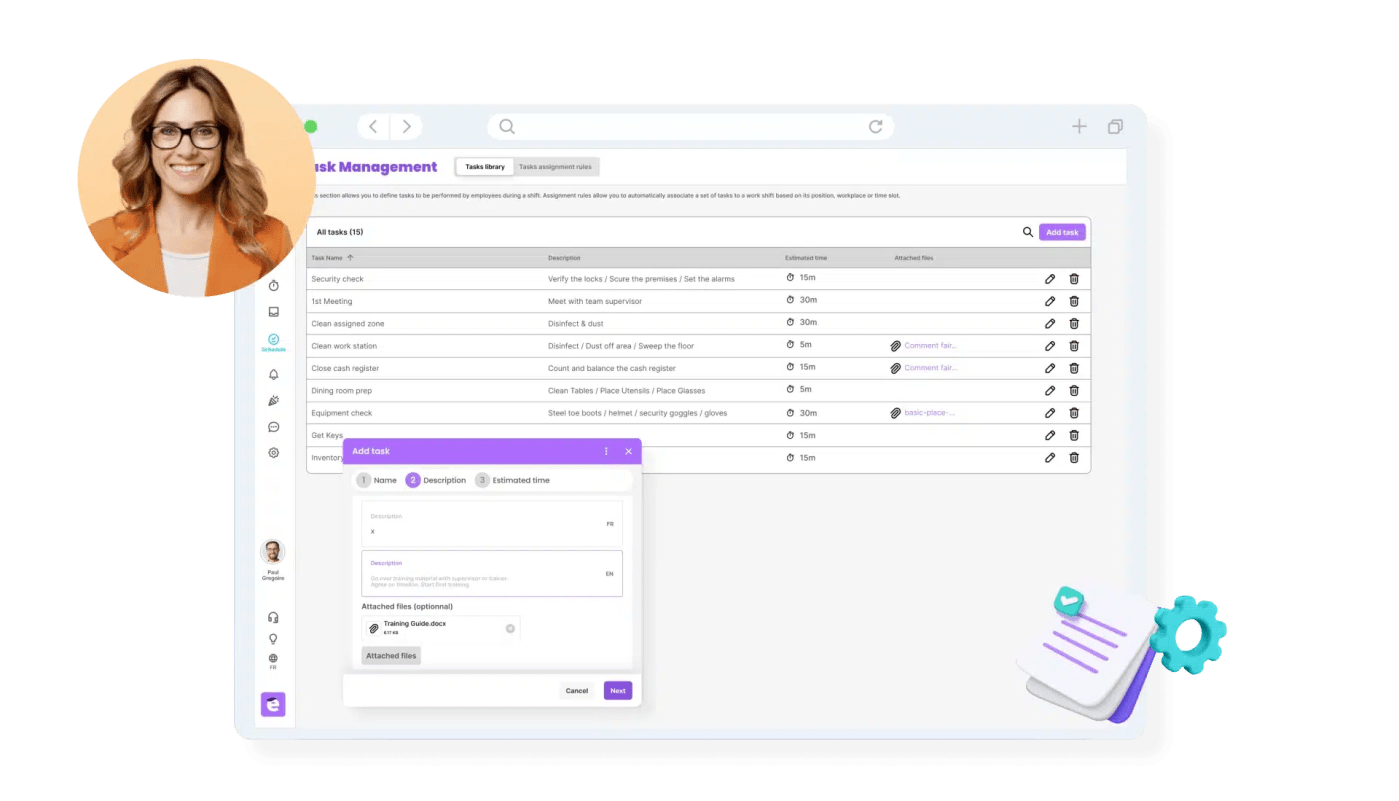
Evolia offers a range of features beyond Employee Scheduling, including Time and Attendance tracking for accurate work hour recording, Task Management for efficient assignment and monitoring of tasks, Leave Management to streamline handling of employee absences, and Team Communications for enhanced internal collaboration.
Imagine if your team had a fun way to communicate during work, without the need for external social media platforms like Snapchat. While making scheduling so much easier.
Final Thoughts
As we see the scheduling landscape change to address the need for flexibility, different staff preferences, labor shortages and new technology, we have to adapt as managers and employers.
Remember, the key to successful retail scheduling lies in balancing business needs with employee well-being, a goal made achievable with the right approach and tools.
So what are you waiting for? Save time and get started using Evolia to solve your retail scheduling problems.
Recruit, Schedule & Manage your Workforce FREE
Evolia’s HR and Workforce Management Platform allows you to recruit, schedule, and manage your employees, saving you countless hours in admin work.
Featured Articles


See Evolia in action. Request a Demo!
Let our experts show you how we can streamline your scheduling and optimize your HR operations.
Get a personalized demo to:
- Automate scheduling and time & attendance.
- Find the workers you need and optimize your internal resources
- Integrated with most HRIS and ERP softwares
We make it work for you!